Email, SMS & keys
Some features need an account with somebody else — an email sender, an SMS carrier, a card processor, an AI provider. This page says which keys unlock what, and what the app does when one is missing.
The rule: a missing key hides the button
The design principle is stated in the code and it is worth understanding before anything else:
"Email and SMS fall back to a console provider when no keys are configured, and a button that only writes to a log is worse than no button: the till should offer a channel only once its adapter is wired, and light up on its own when it is."
So a channel with no key is not shown. The till never offers to email a receipt it cannot send. When the key arrives, the button appears by itself — nothing to switch on.
The keys, and what each one unlocks
These are platform-level settings, held by whoever runs the tech-pos installation. They are not entered from a shop's Settings page.
| Key | Unlocks | Without it |
|---|---|---|
RESEND_API_KEY(with optional RESEND_FROM) |
Emailing receipts, and password-reset emails. | The Email button does not appear on the till's receipt panel. Nothing is sent. |
TWILIO_ACCOUNT_SID +
TWILIO_AUTH_TOKEN + TWILIO_FROM_NUMBER |
Texting receipts. All three are required. | The SMS button does not appear. |
STRIPE_SECRET |
Real Stripe for subscription billing and for Stripe Terminal. | Billing runs on a mock adapter for demos; simulating a payment is refused on the real adapter. |
STRIPE_WEBHOOK_SECRET |
Verifying that billing events really came from Stripe. | Webhook signatures are not verified. |
STRIPE_TERMINAL_LOCATION_ID |
Finding physical Stripe readers. | Simulated readers still work in test mode. |
SQUARE_ACCESS_TOKEN, SQUARE_LOCATION_ID,
SQUARE_DEVICE_ID, SQUARE_ENVIRONMENT |
Square Terminal checkouts, as a platform-wide demo fallback. | Square is refused unless the store has saved its own credentials. |
PAYMENT_CREDENTIALS_KEY |
Encrypting each store's own Stripe / Square secrets and bank Terminal ID. | Saving card credentials is blocked entirely. This one fails closed on purpose — secrets are never stored in the clear. |
INTEGRATION_SECRETS_KEY |
Encrypting webhook URLs and signing secrets on the Integrations page. | They are stored unencrypted in a local development setup. Always set this in production. |
OPENAI_API_KEY or ANTHROPIC_API_KEY |
The in-app store assistant — the AI help on each tab, "Suggest with AI" on the product form, and the aisle-layout suggestions. | A mock assistant that says so: "Mock AI — for the store assistant set OPENAI_API_KEY or ANTHROPIC_API_KEY". The assistant's tool loop refuses to run on the mock at all. |
None of these are required to sell. A shop can run on cash and printed receipts with no keys at all. Add the email key when you want emailed receipts, the Twilio keys when you want texts, and a card processor when you want card payments through the till rather than on a separate machine.
Receipt email and SMS in practice
After a sale the till offers Print, and then — only if the channel can really deliver — Email, SMS and All of them under "Also send digitally?". With neither provider configured, that whole block is absent and Print is the only option.
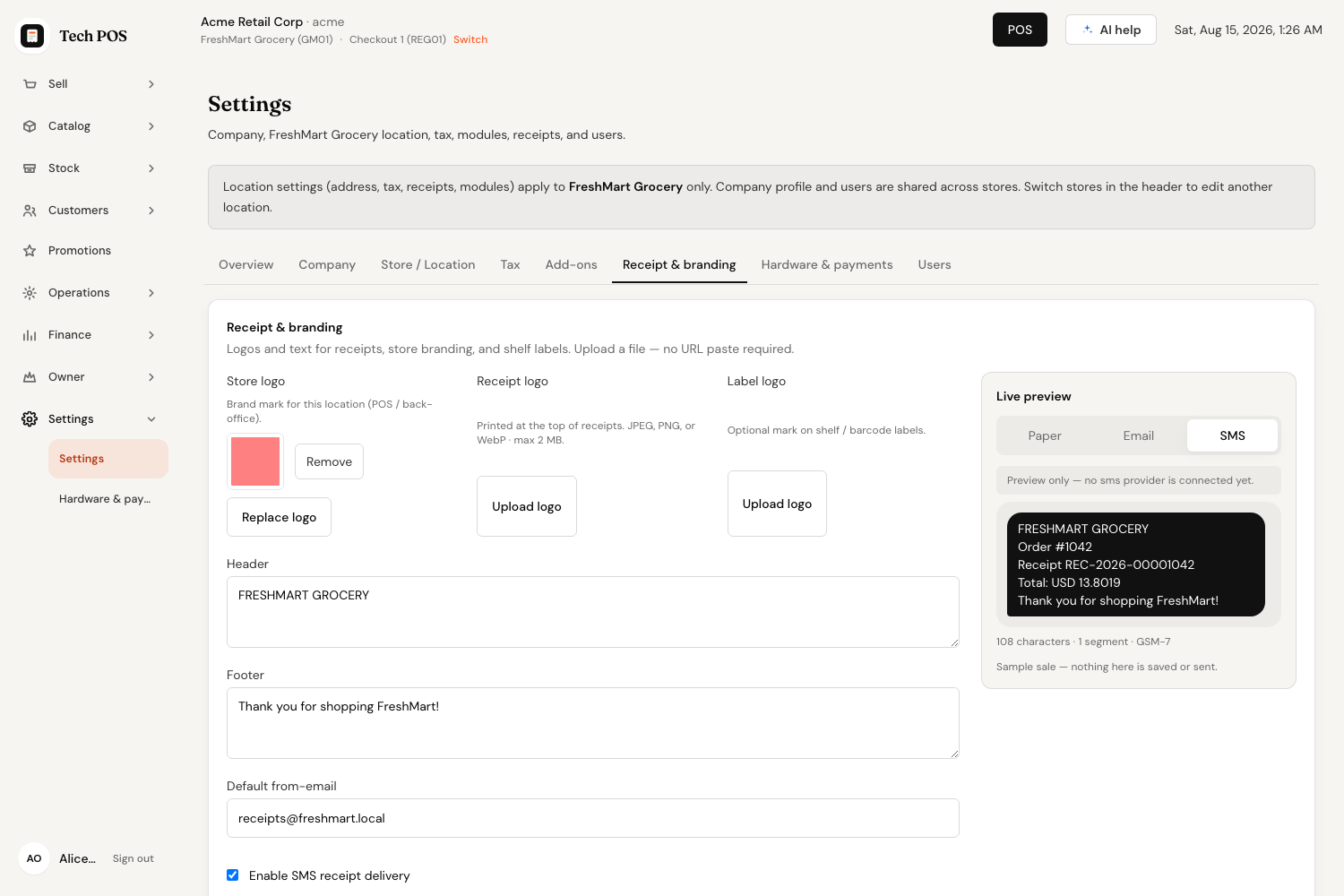
SMS has a second condition: the store must also tick Enable SMS receipt delivery on Settings → Receipt & branding. Both have to be true — the carrier keys and the store setting.
The receipt preview in Settings behaves differently on purpose. It keeps the Paper, Email and SMS tabs whatever the key situation, because the owner still needs to see the wording, and warns instead of hiding:
A store can bring its own card credentials
Card processing is per store, not per platform. On Settings → Hardware & payments → Card payments, pick Stripe or Square as the Terminal provider and the matching credential form appears.
| Square credentials | Stripe credentials |
|---|---|
|
Access token, Location id,
Device id (optional in sandbox),
Environment (Sandbox / Production). Save Square credentials · Clear |
Secret key, Terminal location id. Save Stripe credentials · Clear |
What is saved is encrypted for that store alone and never shown again in full — only "Access token on file: ••••1234". The status badge reads Connected, Needs attention (for example Square with a token but no location) or Not configured. Where a platform-wide demo key is being used instead of yours, the badge says so with "(platform demo)".
Your store's credentials always take precedence over any platform key.
If the platform's credential encryption key is not set, the Save button is disabled and the panel explains: "Credential encryption is not ready on this server. Ask your platform admin to enable payment credential encryption before saving secrets." The same applies to a bank Terminal ID. This is a deliberate refusal, not a bug — see Hardware & card machines.
The Integrations page
Integrations — "Connect webhooks, accounting export, and Slack. Events queue for reliable delivery." It is an add-on and a company-wide page. Nothing here uses a tech-pos key: you supply your own endpoint URL and your own signing secret.
How delivery works
Events are queued when they happen — no network call sits on the checkout path — then delivered by a worker, or immediately when you press Process queue. "Failed rows auto-retry (max 5, backoff)."
The three connectors
| Connector | What it does |
|---|---|
| Generic Webhooks | "POST signed JSON to any HTTPS URL (Zapier, Make, custom ERP). HMAC in X-Tech-Pos-Signature." Choose Sandbox (safe log/mock behavior) or Production (queued HTTPS delivery); production requires both the URL and the signing secret. |
| Accounting export | "QuickBooks Online / Xero-shaped journal & sales export (sandbox mock — no keys required)." Demo only — the page states that production QuickBooks/Xero authorization is not configured. |
| Slack | "Incoming webhook alerts for sales and cash close." Paste your Slack incoming webhook URL; the default events are a finalized sale and a closed cash session. |
Each connection can be opened with Manage to change its name, environment, URL, event subscriptions and delivery switch, and to Replace secret — "Secret is redacted and cannot be viewed." Test webhook sends a sample POST immediately so you can prove the far end is listening.
The delivery log shows When, Connection, Event, Status, Attempts and Last error, with Payload and Retry on each row — which is where you look when a partner system says it never received anything.
Leaving the URL blank quietly puts the connection into log mode rather than refusing it — useful for a dry run, confusing if you expected traffic. Set the environment to Production and fill in both the URL and the secret when you mean it.
Quick answers
| Question | Answer |
|---|---|
| Why is there no Email button after a sale? | No email provider key on the platform. Ask your administrator to set the Resend key. |
| Why is there no SMS button? | Either the three Twilio settings are missing, or "Enable SMS receipt delivery" is off for this store. |
| Can each shop use its own card account? | Yes — Stripe or Square credentials are saved per store. |
| Can I see a saved secret again? | No. Only the last four characters. Replace it if it is lost. |
| Does the AI assistant see my data? | It answers using only what the signed-in user can already see and do, and any write action asks for confirmation first. |